

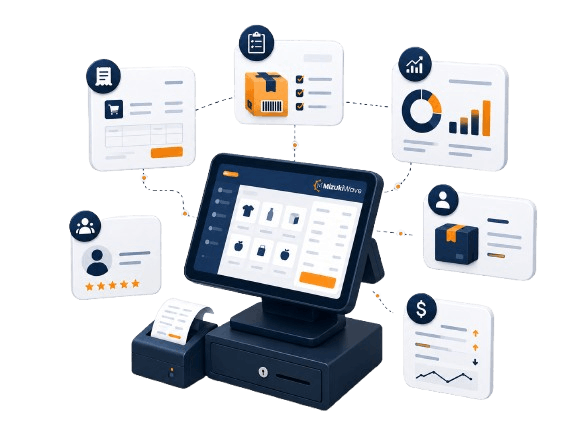
MizukiHub POS is designed for businesses that need more than manual billing. It brings core sales, stock, customer and reporting workflows into one system that can grow with your business.
The system can be planned for small shops and upgraded for stronger workflows when your business grows.
Fast counter billing, product categories, barcode support and daily sales visibility are usually the main focus.
Restaurant workflows can include menu items, table/service needs, orders and future add-on planning.
Suitable for service sales, product sales, customer records and simple staff/user access needs.
Can support product records, stock visibility, supplier purchases and reporting workflows after scope review.
Useful for larger product lists, category organization, supplier purchases and stock tracking.
Supports high-volume billing, product lookup, basic inventory visibility and owner dashboard review.
Branch, warehouse and staff workflows can be reviewed for an upgraded or custom setup.
Can help organize products, customers, sales records and future e-commerce connection planning.
Final access to modules depends on selected plan, setup, quotation and business requirements.
Create products, categories, brands and variants; Manage product barcodes, prices and taxes.
Generate invoices and track stock movement; Manage low stock and product quantity visibility.
Fast billing interface for counter sales; Customer selection and quick product search.
Track sales history and daily totals; Review sales by product or customer.
Prepare quotations before final invoices; Convert quotation workflows into orders when needed.
Record supplier purchases and expenses; Track cost-side information.
Plan stock locations and branches; Support transfers and location-based workflows.
Save customer and supplier profiles; Support follow-up and purchase tracking.
Sales, stock and profit reports; Dashboard summaries for decisions.
Plan low-stock or expiry reminders; Use customer or internal notifications where required.
Quick view of sales, stock and operations; Simple visibility for owners/managers.
App settings, user permissions and languages; Calendar, calculator and on-screen keyboard.
These details help you understand what to discuss before setup.
This section lists the specific feature names requested for review, using the same clean card style as the rest of the site.
Support standard products, combo products, and digital products depending on the approved setup.
Update product details, prices, or quantities in bulk when the data is prepared correctly.
Import product data using CSV files and export product information for external use where supported.
Manage different sizes, colors, models, weights, brands, or other product options.
Generate invoices from sales or quotation workflows depending on setup.
Use invoice templates that can include business details, logo, contact information, and approved invoice information.
Apply taxes and discounts on invoices when configured for the business.
Create and manage purchase orders and purchase records for supplier stock workflows.
Use a practical POS interface for everyday counter billing and fast sales handling.
Use virtual keyboard support for touch-friendly or counter-based POS usage.
Speed up cash transactions with common cash amount buttons.
Hold or suspend sales for later processing when a customer or order needs more time.
Show transaction information on a customer-facing display when the hardware setup supports it.
Track all sales transactions with detailed records for owner or manager review.
Issue and manage gift cards when the feature or module is included in the selected setup.
Process and record sales returns and refunds so return records stay organized.
Create, manage, and review quotations before confirming sales or purchase orders.
Download quotations and orders as PDF documents where supported.
Track order status and fulfillment progress for customer or internal order workflows.
Create and manage supplier purchase orders with payment records where needed.
Track and categorize business expenses such as stock costs, utilities, transport, packaging, or other operating costs.
Import purchase data through prepared CSV files where applicable.
Manage stock across more than one shop, branch, or warehouse depending on the selected plan.
Transfer stock between shops or warehouses with tracking.
Import or export stock transfer data where supported.
Set low stock or product expiry alerts where applicable.
Create and manage customer details for repeat sales, follow-up, loyalty, or reports.
Create and manage supplier contact and purchase details.
Import or export customer and supplier data using CSV files when prepared correctly.
Group customers for pricing, loyalty, wholesale, VIP, or targeted marketing workflows where applicable.
View sales reports with useful filters depending on setup.
Review purchase orders and supplier performance.
View stock levels, stock value, and stock movements.
Review profit and loss information where configured.
Custom reports can be planned by quotation after confirming fields, filters, calculations, and output format.
Useful for products with low stock or expiry-sensitive inventory.
Notify staff about important events, updates, stock alerts, or workflow actions where supported.
Send selected customer notifications about orders, updates, or promotions where technically suitable.
View business overview charts and best-selling product information.
Track latest sales, quotations, purchases, transfers, customers, suppliers, and other system activity.
Configure logo, categories, variants, currencies, tax rates, customer groups, price groups, and email templates where supported.
Manage staff permissions by role or group so each user gets suitable access.
Track events and important dates with calendar-based support where included.
Support multiple languages depending on configuration and available language options.
Use built-in calculator and virtual keyboard support for POS workflows.
Prices are starting points. Setup, training, hardware, product import and custom modules may be quoted separately.
Small shops and basic billing. Also Rs. 25,000/year.
Active shops with purchases, suppliers, expenses and better reports. Also Rs. 45,000/year.
Growing businesses with stronger stock, staff and location needs. Also Rs. 75,000/year.
Advanced workflows, multi-location, restaurant, supermarket or custom needs. Also from Rs. 125,000/year.
Add-ons are quoted based on plan, workflow and exact requirement.
Adds restaurant-specific workflows such as menu/order handling after requirement review.
Supports customer rewards or repeat-purchase ideas when suitable for the business model.
Connects selected product or order workflows with online selling requirements after scoping.
Used when another website, accounting tool, reporting system or custom workflow must connect.
Checks printer, scanner, cash drawer, terminal and device compatibility before purchase decisions.
Helps move prepared product lists into the system using clean spreadsheet/data formats.
Provides guided setup support for owner, manager or staff usage depending on the selected plan.
Adds business-specific sales, stock, profit or workflow reports after report fields are confirmed.
Useful for businesses that need low-stock, expiry or reorder reminders after setup review.
Can support selected customer messaging or follow-up workflows where technically suitable.
Organizes staff access by role so owners can control what each user can see or change.
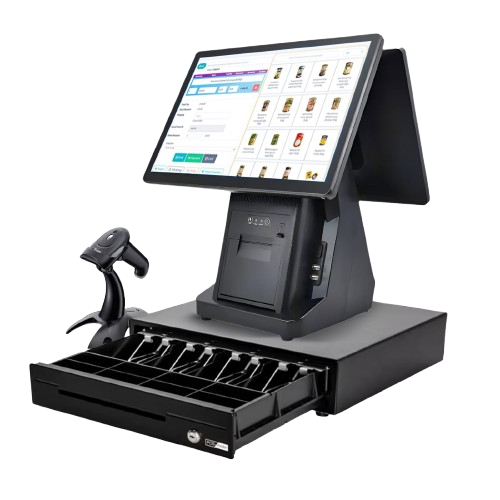
Hardware such as printers, barcode scanners, cash drawers, tablets and displays should be quoted separately after checking compatibility and business requirements.
Send your business type, product count, users, locations and required features. MizukiWave can recommend the best MizukiHub POS plan and optional modules.